# OpenFn/Lightning [](https://dl.circleci.com/status-badge/redirect/gh/OpenFn/lightning/tree/main) [](https://codecov.io/gh/OpenFn/lightning)  [](https://digitalpublicgoods.net/r/openfn)
Lightning ⚡ (aka "OpenFn v2") is a workflow automation platform that's used to
automate critical business processes and integrate information systems. From
last-mile services to national-level reporting, it boosts efficiency &
effectiveness while enabling secure, stable, scalable interoperability and data
integration at all levels.
**Use it online at [app.openfn.org](https://app.openfn.org)**
**Explore in a sandbox on [demo.openfn.org](#demo-sandbox)**
**Or learn more at
[docs.openfn.org](https://docs.openfn.org/documentation/about-lightning)**
> OpenFn **Lightning** is:
>
> - the **latest version** of OpenFn: first launched in 2014, it's been tried
> and tested by NGOs and governments in 40+ countries
> - fully **open source**: there's no "community edition" and "premium edition",
> you get the same product whether you are self-hosting or using the
> OpenFn.org software-as-a-service
> - the leading [DPGA](https://digitalpublicgoods.net/) certified **Digital
> Public Good** for workflow automation
> - a [Digital Square](https://digitalsquare.org/digital-health-global-goods)
> certified **Global Good for Health**
## Contents
- [Demo](#demo)
- [Features](#features)
- [Build](#build)
- [Monitor](#monitor)
- [Manage](#manage)
- [Roles and permissions](#roles-and-permissions)
- [Roadmap](#roadmap)
- [Getting Started](#getting-started)
- [**Run** via Docker](#run-via-docker)
- [**Deploy** on external infrastructure](#deploy-on-external-infrastructure)
- [**Dev** on Lightning locally](#dev-on-lightning-locally)
- [Security and Standards](#security-and-standards)
- [**Contribute** to this project](#contribute-to-this-project)
- [Pick up an issue](#pick-up-an-issue)
- [Open a pull request](#open-a-pull-request)
- [Generate the docs pages](#generate-the-docs-pages)
- [Server Specs for Self-Hosting](#server-specs-for-self-hosting)
- [Benchmarking](#benchmarking)
- [Troubleshooting](#troubleshooting)
- [Problems with environment variables](#problems-with-environment-variables)
- [Problems with Postgres](#problems-with-postgres)
- [Problems with Debian](#problems-with-debian)
- [Problems with Docker](#problems-with-docker)
- [Support](#support)
## Demo
Watch a short [demo video](https://www.youtube.com/watch?v=BNaxlHAWb5I) or
explore a **[public sandbox](https://demo.openfn.org/)** with the login details
below, but please note that this deployment is reset every night at 12:00:00 UTC
and is 100% publicly accessible. **_Don't build anything you want to keep, or
keep private!_**
```
username: demo@openfn.org
password: welcome12345
```
## Features
### Build
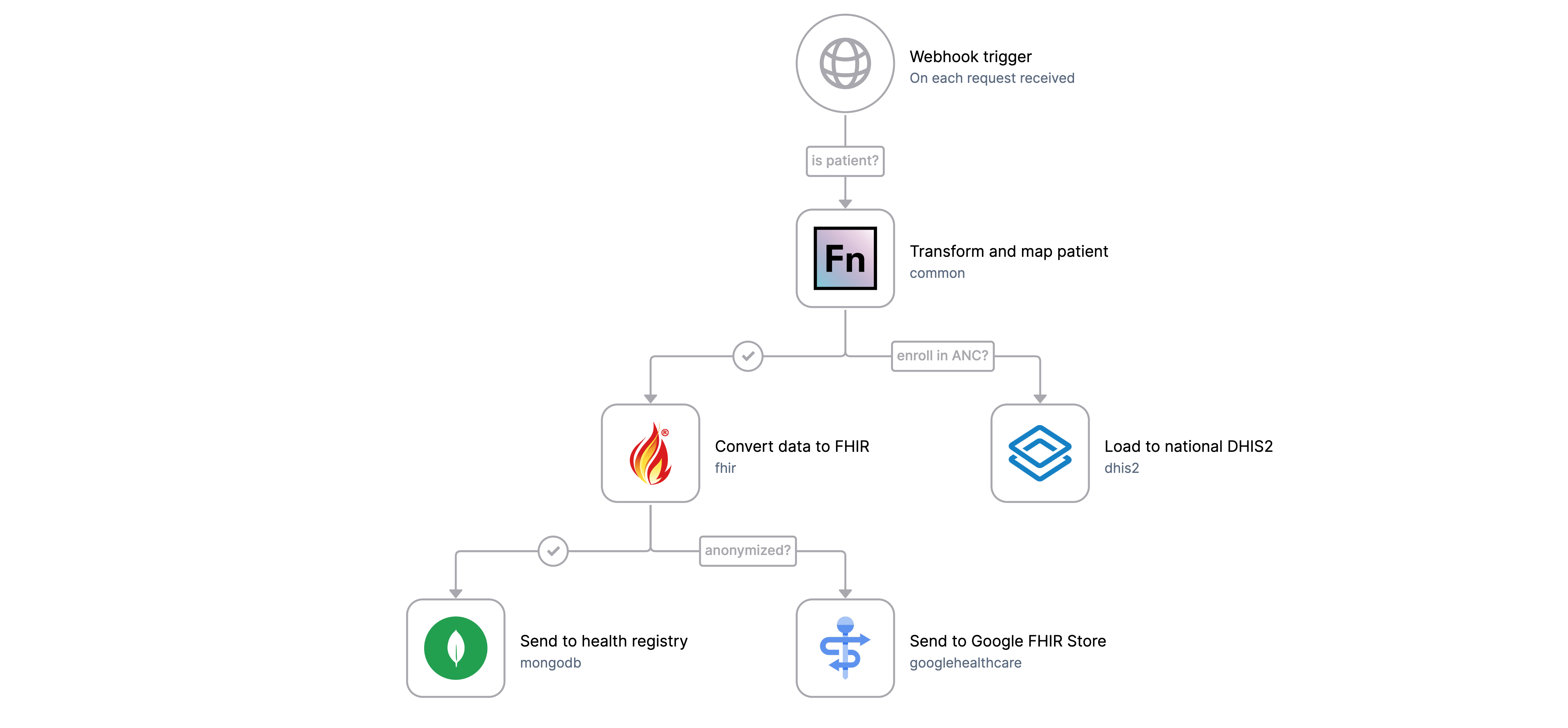
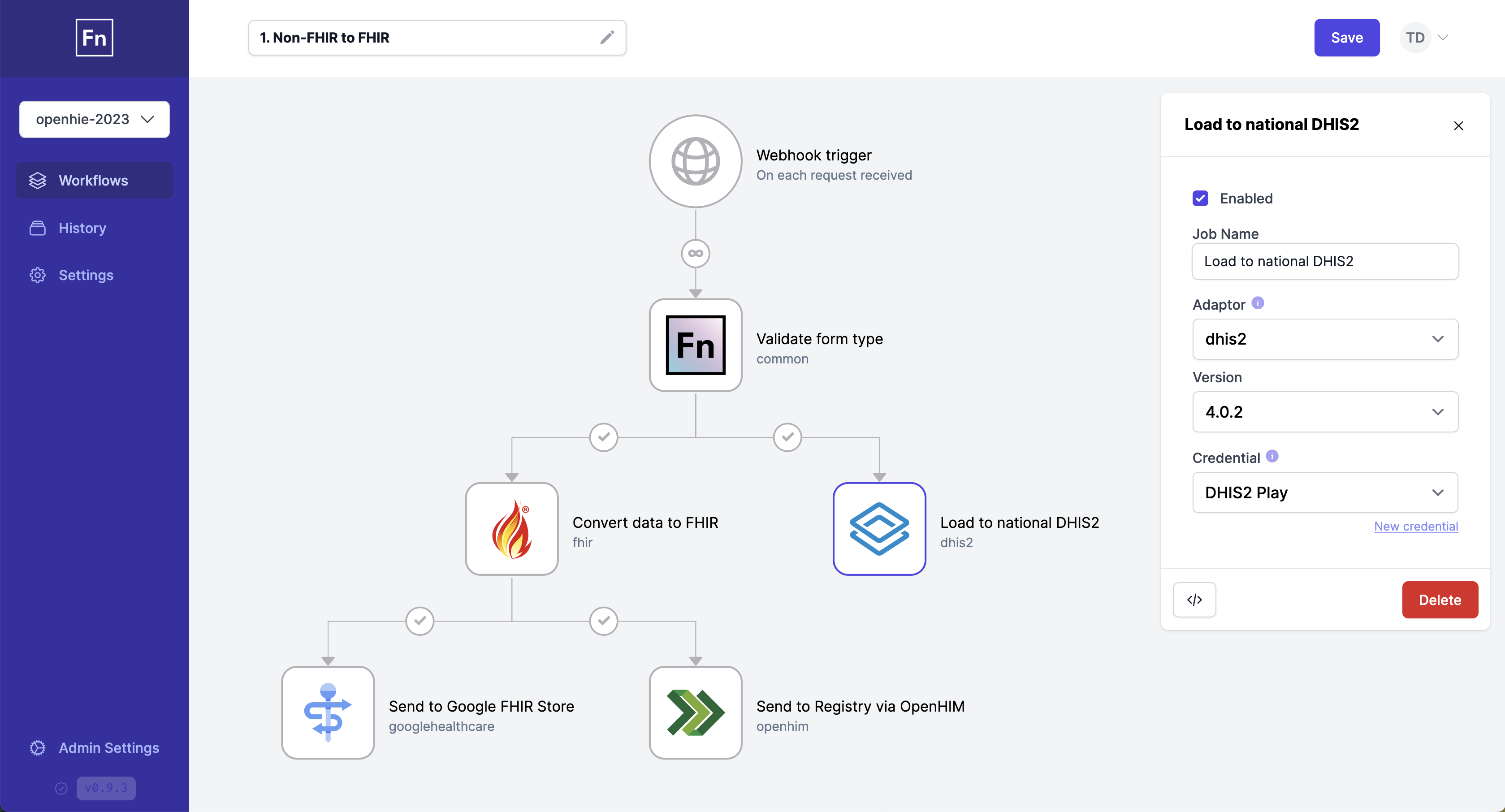
Plan and build workflows using Lightning's visual interface to quickly define
when, where and what you want your automation to do.
Use our
[CLI](https://github.com/OpenFn/kit/blob/main/packages/cli/README.md#openfncli)
to quickly build, edit and deploy projects from the comfort of your own code
editor.
### Monitor
Monitor all workflow activity in one place.
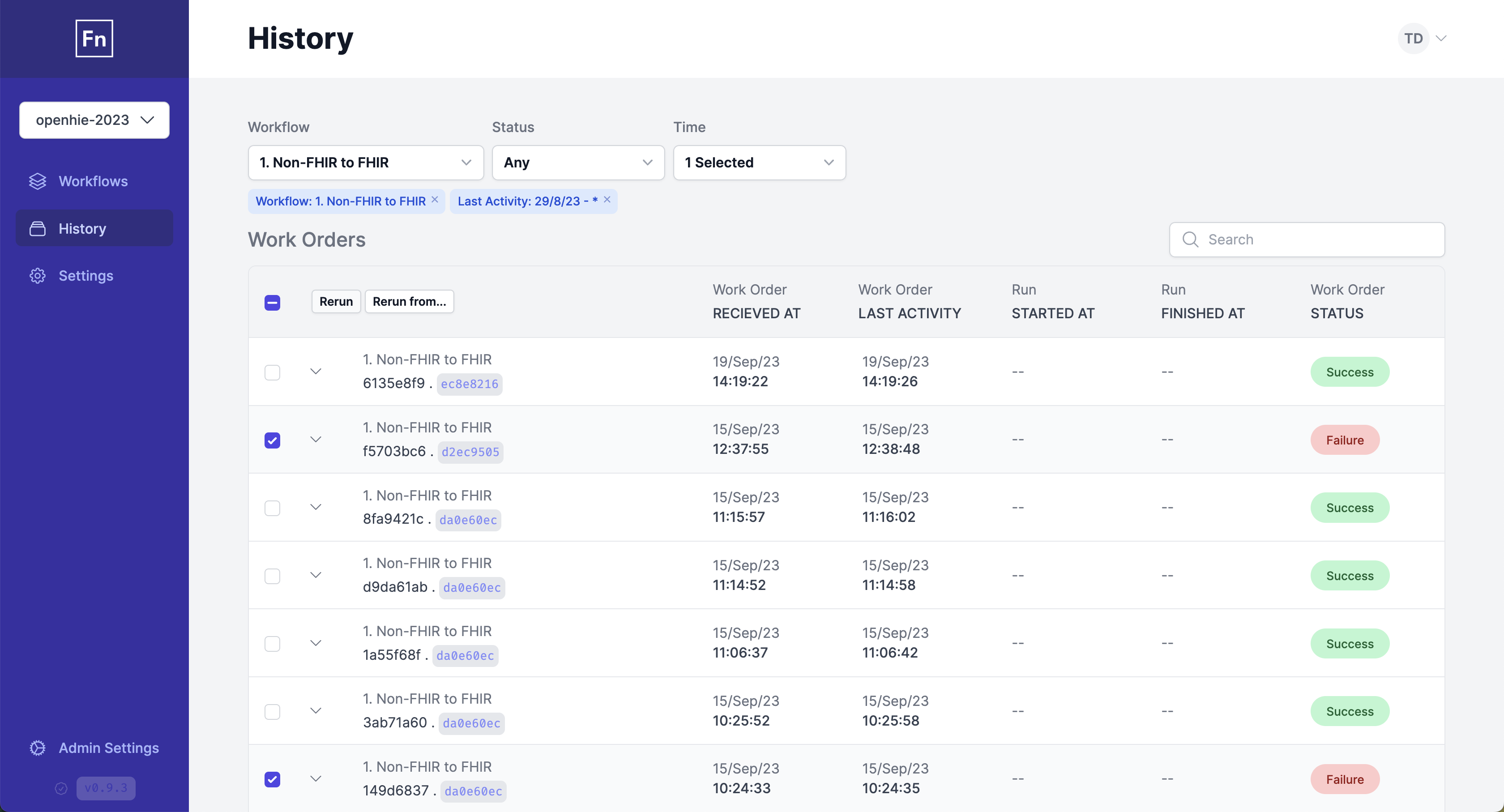
- Filter and search runs to identify issues that need addressing and follow how
a specific request has been processed
- Configure alerts to be notified on run failures
- Receive a project digest for a daily/weekly/monthly summary of your project
activity
### Manage
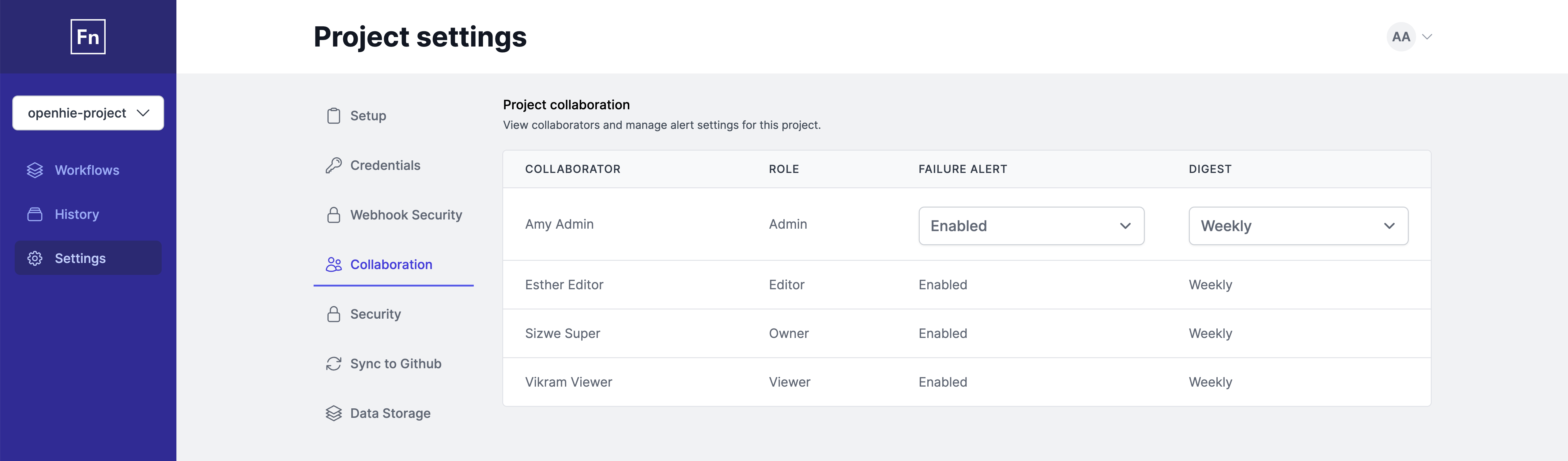
Manage users and access by project.
### Roles and permissions
Authorization is a central part of Lightning. As such, users are given different
roles which determine what level of access they have for resources in the
application. For more details about roles and permissions in Lightning, please
refer to our
[documentation](https://docs.openfn.org/documentation/about-lightning#roles-and-permissions).
### Roadmap
View our
[public GitHub project](https://github.com/orgs/OpenFn/projects/3/views/1) to
see what we're working on now and what's coming next.
## Getting Started
- If you only want to [_**RUN**_](#run-via-docker) Lightning on your own server,
we recommend using Docker.
- If you want to [_**DEPLOY**_](#deploy-on-external-infrastructure) Lightning,
we recommend Docker builds and Kubernetes.
- If you want to [_**CONTRIBUTE**_](#contribute-to-this-project) to the project,
we recommend
[running Lightning on your local machine](#run-lightning-locally).
### **Run** via Docker
1. Install the latest version of
[Docker](https://docs.docker.com/engine/install/)
2. Clone [this repo](https://github.com/OpenFn/Lightning) using git
3. Setup PostgreSQL database with:
`docker compose build && docker compose run --rm web mix ecto.migrate`
4. Run Lightning and PostgresSQL with: `docker compose up`
By default the application will be running at
[localhost:4000](http://localhost:4000/).
See ["Problems with Docker"](#problems-with-docker) for additional
troubleshooting help. Note that you can also create your own
`docker-compose.yml` file, configuring a postgres database and using a
[pre-built image](https://hub.docker.com/repository/docker/openfn/lightning)
from Dockerhub.
### **Deploy** on external infrastructure
Head to the [Deploy](https://docs.openfn.org/documentation/deploy/options)
section of our docs site to get started.
For technical guidelines, see [deployment considerations](DEPLOYMENT.md) for
more detailed information.
### **Dev** on Lightning locally
#### Clone the repo and optionally set ENVs
```sh
git clone git@github.com:OpenFn/Lightning.git # or from YOUR fork!
cd Lightning
cp .env.example .env # and adjust as necessary!
```
Take note of database names and ports in particular—they've got to match across
your Postgres setup and your ENVs. You can run lightning without any ENVs
assuming a vanilla postgres setup (see below), but you may want to make
adjustments.
#### Database Setup
If you're already using Postgres locally, create a new database called
`lightning_dev`, for example.
If you'd rather use Docker to set up a Postgres DB, create a new volume and
image:
```sh
docker volume create lightning-postgres-data
docker create \
--name lightning-postgres \
--mount source=lightning-postgres-data,target=/var/lib/postgresql/data \
--publish 5432:5432 \
-e POSTGRES_PASSWORD=postgres \
postgres:15.3-alpine
docker start lightning-postgres
```
#### Elixir & Ecto Setup
We use [asdf](https://github.com/asdf-vm/asdf) to configure our local
environments. Included in the repo is a `.tool-versions` file that is read by
asdf in order to dynamically make the specified versions of Elixir and Erlang
available.
You'll need to install asdf plugins for Erlang, NodeJs, Elixir, and k6.
**Important**: Before installing these plugins, make sure to follow the
prerequisite installation steps for each plugin (linked below), as they often
require system dependencies to be installed first:
- [Erlang](https://github.com/asdf-vm/asdf-erlang) - **Follow the "Before asdf
install" section**
- [NodeJs](https://github.com/asdf-vm/asdf-nodejs)
- [Elixir](https://github.com/asdf-vm/asdf-elixir)
- [k6](https://github.com/grimoh/asdf-k6)
Then follow the installation instructions for each plugin from their respective
documentation pages.
We use [libsodium](https://doc.libsodium.org/) for encoding values as required
by the
[Github API](https://docs.github.com/en/rest/guides/encrypting-secrets-for-the-rest-api).
You'll need to install `libsodium` in order for the application to compile.
For Mac Users:
```sh
brew install libsodium cmake
```
For Debian Users:
```sh
sudo apt-get install libsodium-dev cmake
```
You can find more on
[how to install libsodium here](https://doc.libsodium.org/installation)
```sh
asdf install # Install language versions
./bin/bootstrap
```
#### Run the app
Lightning is a web app. To run it in interactive Elixir mode, start the
development server by running with your environment variables by running:
```sh
iex -S mix phx.server
```
or if you have set up custom environment variables, run:
```sh
env $(cat .env | grep -v "#" | xargs ) iex -S mix phx.server
```
Once the server has started, head to [`localhost:4000`](http://localhost:4000)
in your browser.
#### Run the tests
Before the first time running the tests, you need a test database setup.
```sh
MIX_ENV=test mix ecto.create
```
And then after that run the tests using:
```sh
MIX_ENV=test mix test
```
We also have `test.watch` installed which can be used to rerun the tests on file
changes.
##### Chasing flaky tests
`bin/repeat_mix_test` runs the suite (or given files) repeatedly and records
each run's first-pass result — unlike `bin/ci_tests`, it never retries, so a
flake shows up instead of being papered over.
```sh
bin/repeat_mix_test 30 test/lightning/workflows_test.exs
CI_TIMING=1 bin/repeat_mix_test 11 # cap schedulers and shorten assert_receive
# timeouts to match CircleCI
```
It uses its own test database (`MIX_TEST_PARTITION=flaky`) so a long loop can't
collide with another checkout, and writes logs plus a `summary.tsv` to
`.scratch/runs//`.
`bin/gather_ci_logs [N]` pulls the "Run Elixir tests" output from the last N
`test_elixir` CircleCI jobs on `main` into `.scratch/ci-logs/`, flagging the
builds that went green only because the retry pass saved them. Needs `jq`.
## Security and Standards
We use a host of common Elixir static analysis tools to help us avoid common
pitfalls and make sure we keep everything clean and consistent.
In addition to our test suite, you can run the following commands:
- `mix format --check-formatted` Code formatting checker, run again without the
`--check-formatted` flag to have your code automatically changed.
- `mix dialyzer` Static analysis for type mismatches and other common warnings.
See [dialyxir](https://github.com/jeremyjh/dialyxir).
- `mix credo --strict --all` Static analysis for consistency, and coding
standards. See [Credo](https://github.com/rrrene/credo).
- `mix sobelow` Check for commonly known security exploits. See
[Sobelow](https://sobelow.io/).
- `MIX_ENV=test mix coveralls` Test coverage reporter. This command also runs
the test suite, and can be used in place of `mix test` when checking
everything before pushing your code. See
[excoveralls](https://github.com/parroty/excoveralls).
> For convenience there is a `verify` mix task that runs all of the above and
> defaults the `MIX_ENV` to `test`.
### Formatting
`bin/format` runs Prettier on JavaScript, TypeScript, CSS, HTML, JSON, YAML and
Markdown, and `mix format` on Elixir:
```bash
bin/format # format everything, and run eslint --fix
bin/format --changed # the same, for files changed on your branch
bin/format --check # check Prettier files without writing; CI runs this
bin/format --staged # format staged files; the pre-commit hook runs this
```
The pre-commit hook installs itself when you compile in dev, so you rarely need
to run this by hand. If you only build in Docker you won't have the hook, and CI
will catch what it would have fixed.
To stop Prettier formatting a file, add it to `.prettierignore` with a comment
saying why.
CI doesn't run ESLint or TypeScript yet, because neither passes on the whole
tree. Run them on the code you touch: `cd assets && npm run lint` and
`cd assets && npx tsc --build`.
For more guidance on security best practices for workflow automation
implementations, check out OpenFn Docs:
[docs.openfn.org/documentation/getting-started/security](https://docs.openfn.org/documentation/getting-started/security)
## **Contribute** to this project
First, thanks for being here! You're contributing to a digital public good that
will always be free and open source and aimed at serving innovative NGOs,
governments, and social impact organizations the world over! You rock. ❤️
FYI, Lightning is built in [Elixir](https://elixir-lang.org/), harnessing the
[Phoenix Framework](https://www.phoenixframework.org/). Currently, the only
unbundled dependency is a [PostgreSQL](https://www.postgresql.org/) database.
If you'd like to contribute to this projects, follow the steps below:
### Pick up an issue
Read through the existing [issues](https://github.com/OpenFn/Lightning/issues),
assign yourself to the issue you have chosen. Leave a comment on the issue to
let us know you'll be working on it, and if you have any questions of
clarifications that would help you get started ask them there - we will get back
to you as soon as possible.
If there isn't already an issue for the feature you would like to contribute,
please start a discussion in our
[community forum](https://community.openfn.org/c/feature-requests/12).
### Open a pull request
1. Clone the Lightning repository, then
[fork it](https://docs.github.com/en/get-started/quickstart/fork-a-repo).
2. Run through [setting up your environment](#set-up-your-environment) and make
your changes.
3. Make sure you have written your tests and updated /CHANGELOG.md (in the
'Unreleased' section, add a short description of the changes you are making,
along with a link to your issue).
4. Open a draft pull request by clicking "Contribute > Open Pull Request" from
your forked repository. Fill out the pull request template (this will **be**
added automatically for you), then make sure to self-review your code and go
through the 'Review checklist'. Don't worry about the QA checkbox, our
product manager Amber will tick that once she has reviewed your PR. You can
leave any notes for the reviewer in a comment.
5. Once you're ready to submit a pull request, you can mark your draft PR as
'Ready for review' and assign @stuartc or @taylordowns2000.
### Generate the docs pages
You can generate the HTML and EPUB documentation locally using:
`mix docs` and opening `doc/index.html` in your browser.
## Server Specs for Self-Hosting
For recommend server specifications for self-hosting of Lightning, head to the
[deployment planning](https://docs.openfn.org/documentation/deploy/options)
section of the documentation or check out this
[self-hosting thread](https://community.openfn.org/t/specs-for-self-hosting-lightning/292)
on our community forum.
## Benchmarking
We are using [k6](https://k6.io/) to benchmark Lightning. Under
`tooling/benchmarking` folder you can find a script for benchmarking Webhook
Workflows.
See [Benchmarking](tooling/benchmarking/README.md) for more detailed
information.
## Troubleshooting
### Switching branches during development
Branches can have different dependencies. Run the bootstrap script to sync
everything:
```sh
./bin/bootstrap
```
This handles Elixir dependencies, npm packages, native libraries, and database
migrations.
If the server was running, restart it after bootstrap completes.
### Problems with environment variables
For troubleshooting custom environment variable configuration it's important to
know how an Elixir app loads and modifies configuration. The order is as
follows:
1. Stuff in `config.exs` is loaded.
2. _That_ is then modified (think: _overwritten_) by stuff your ENV-specific
config: `dev.exs`, `prod.exs` or `test.exs`.
3. _That_ is then modified by `runtime.exs` which is where you are allowed to
use `System.env()`
4. _Finally_ `init/2` (if present in a child application) gets called (which
takes the config which has been set in steps 1-3) when that child application
is started during the parent app startup defined in `application.ex`.
### Problems with Postgres
If you're having connection issues with Postgres, check the database section of
your `.env` to ensure the DB url is correctly set for your environment — note
that composing a DB url out of other, earlier declared variables, does not work
while using `xargs`.
### Problems with Debian
If you're getting this error on debian
```
==> earmark_parser
Compiling 1 file (.yrl)
/usr/lib/erlang/lib/parsetools-2.3.1/include/yeccpre.hrl: no such file or directory
could not compile dependency :earmark_parser, "mix compile" failed. You can recompile this dependency with "mix deps.compile earmark_parser", update it with "mix deps.update earmark_parser" or clean it with "mix deps.clean earmark_parser"
```
You need to install erlang development environment `sudo apt install erlang-dev`
[refer to this issue](https://github.com/elixir-lang/ex_doc/issues/1441)
### Problems with Docker
#### Versions
The build may not work on old versions of Docker and Docker compose. It has been
tested against:
```
Docker version 20.10.17, build 100c701
Docker Compose version v2.6.0
```
#### Starting from scratch
If you're actively working with docker, you start experiencing issues, and you
would like to start from scratch you can clean up everything and start over like
this:
```sh
# To remove any ignored files and reset your .env to its example
git clean -fdx && cp .env.example .env
# You can skip the line below if you want to keep your database
docker compose down --rmi all --volumes
docker compose build --no-cache web && \
docker compose create --force-recreate
docker compose run --rm web mix ecto.migrate
docker compose up
```
#### Apple Silicon
When running `docker compose up` on Apple Silicon (aarch64), you might encounter
the following error:
```
[notice] Application ssl exited: exited in: :ssl_app.start(:normal, [])
** (EXIT) an exception was raised:
** (ArgumentError) could not call Module.put_attribute/3 because the module Lightning.MixProject is already compiled
(elixir 1.16.2) lib/module.ex:2360: Module.assert_not_readonly!/2
(elixir 1.16.2) lib/module.ex:2041: Module.__put_attribute__/5
(ssl 11.1.4) ssl_app.erl:35: :ssl_app.stop/1
(kernel 9.2.4) application_master.erl:293: :application_master.start_it_old/4
** (MatchError) no match of right hand side value: {:error, {:ssl, {:bad_return, {{:ssl_app, :start, [:normal, []]}, {:EXIT, {%ArgumentError{message: "could not call Module.put_attribute/3 because the module Lightning.MixProject is already compiled"}, [{Module, :assert_not_readonly!, 2, [file: ~c"lib/module.ex", line: 2360]}, {Module, :__put_attribute__, 5, [file: ~c"lib/module.ex", line: 2041]}, {:ssl_app, :stop, 1, [file: ~c"ssl_app.erl", line: 35]}, {:application_master, :start_it_old, 4, [file: ~c"application_master.erl", line: 293]}]}}}}}}
```
You can resolve this by setting `ERL_FLAGS="+JPperf true"` env to the failing
stage. You can follow this thread on our community forum for more info:
[no matching manifest for linux/arm64/v8 in the manifest list entries](https://community.openfn.org/t/lightning-prebuilt-images-throw-no-matching-manifest-for-linux-arm64-v8-in-the-manifest-list-entries/465/15)
## Support
If you have any questions, feedback, or issues, please:
- Post on the OpenFn Community at
[community.openfn.org](https://community.openfn.org)
- Open an issue directly on this GitHub Repo:
[github.com/OpenFn/Lightning/issues](https://github.com/OpenFn/Lightning/issues)