WCS Miscellaneous
Project Overview & Prerequisites
This workflow supports WCS efforts to protect sharks, and rays by enabling the structured collection and integration of survey data into a centralized MS SQL database. Sharks and rays are some of the ocean’s most threatened species, often overlooked in marine conservation. WCS works across critical regions to better understand and manage these species by engaging with communities, researchers, and policymakers.
This integration streamlines the management of KoboToolbox data collected through community monitoring, catch surveys, and other field assessments. Submissions are cleaned, transformed, and inserted into the SharksRays database, helping WCS track species presence, fishing pressures, and conservation impact over time.
➡️ To find out more about WCS’s work with sharks and rays, visit wcs.org.
Prerequisites
- KoboToolbox API credentials
- MS SQL credentials and defined schema for
SharksRaystables - Mappings between Kobo dropdown fields and internal ExtCode values (e.g., species, region, survey type)
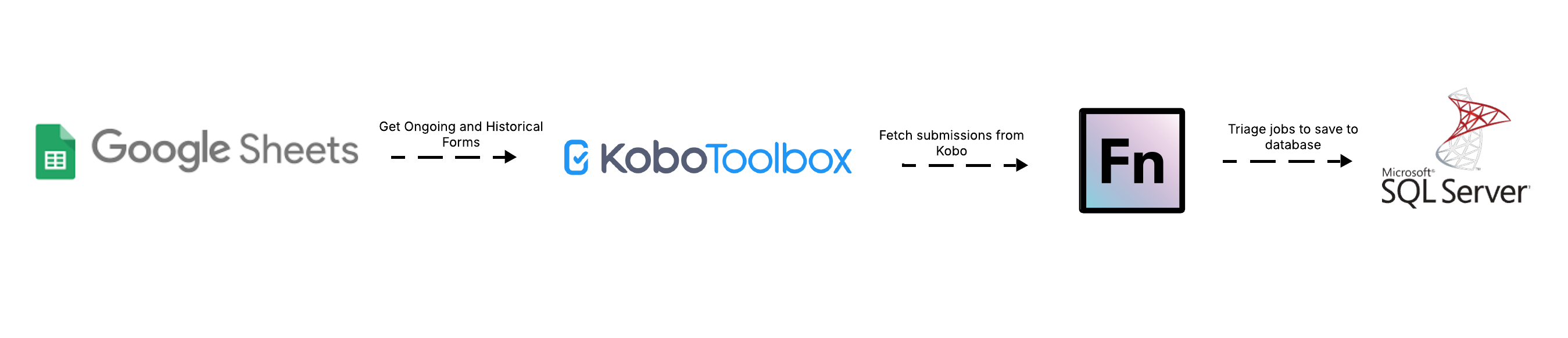
Workflow Diagram
Field-to-DB Mappings
N/A — mappings are auto-generated via the automation solution.
Data Flows & Workflow Descriptions
Overview
1. KM1. Get List of Kobo Forms
- Utility workflow that connects to the KoboToolbox API
- Retrieves metadata for all forms available to the authenticated account
- Writes form details (title, owner, ID) into a shared Google Sheet
- Supports easier onboarding and monitoring of forms across projects
2. Sharks & Rays 1.1 Get Forms Ongoing
- Runs on a schedule to fetch recent submissions from deployed forms
- Pulls form configurations from the Google Sheet where
auto_sync = TRUE - Filters submissions based on a rolling timestamp (
manualCursor) to avoid duplicates - Posts each submission to the OpenFn Inbox for downstream processing
3. Sharks & Rays 1.2 Get Forms Historical
- Similar to the Ongoing workflow but fetches older submissions
- Triggered manually, used for backfilling or onboarding historical forms
- Targets forms marked with
historical_sync = TRUEin the Google Sheet - Includes both deployed and archived Kobo forms
4. Sharks & Rays 2. Sync Forms to Database
- Webhook-triggered workflow that runs when submissions are posted to the Inbox
- Triages each submission by
tableId, and maps it to the correct upsert logic - Uses
findValuelookups to convert Kobo labels to ExtCodes for species, region, and survey types - Upserts a parent record to the
SharksRaystable - Processes species repeat groups using
upsertManyinto the linked child table - Ensures no duplication using composite keys (e.g.,
_id+_xform_id_string)
Triggers & Scheduling
| Workflow | Trigger Type | Schedule |
|---|---|---|
KM1. Get List of Kobo Forms | Manual | Run as needed |
Sharks & Rays 1.1 Ongoing | Cron | Every 3–6 hours |
Sharks & Rays 1.2 Historical | Manual | Run as needed |
Sharks & Rays 2. Sync Forms | Webhook | Runs on submission |
Job Code Structure
Each OpenFn job in the Sharks & Rays workflow follows a consistent structure designed to make it easy to manage incoming KoboToolbox submissions and store them properly in the WCS database. While the code is written in JavaScript, the logic is organized in a way that can be understood by both technical and non-technical users.
1. Check if the data should be processed
The job starts by checking whether the Kobo submission is valid:
- Is it real data (not a test or incomplete submission)?
- Does it include required fields like submission ID, region, and survey type?
If anything critical is missing, the submission is skipped, and a message is logged for follow-up.
2. Read and clean form responses
Next, the job reads each answer from the form and ensures it’s clean and usable:
- Extra spaces are removed
- Dates and boolean values are standardized
- Null or empty values are handled safely
This ensures the data is clean and consistent before it’s saved.
3. Match answers to internal codes
Some form fields use dropdowns or select lists. The answers provided in Kobo (labels) need to be matched to standard internal codes used in the database.
To do this, the job checks each answer against a reference list in the database and finds the corresponding internal code (called an “ExtCode”). This is required to keep the data aligned with existing systems.
If no match is found, the job logs a warning for the data team to review.
4. Build the database records
Once the values are ready, the job constructs:
- A parent record with the main survey-level data (e.g., region, survey date, team)
- One or more child records for any repeated sections in the form (e.g., multiple species observed)
A unique ID is assigned to each submission so the parent and child records stay linked together in the database.
5. Save the data
The job then saves the records into the database:
- The parent record is inserted or updated using
upsert() - The list of child records is inserted using
upsertMany()
This ensures no duplicate data is created and any updates are applied correctly.
Assumptions
- Kobo form submissions must be linked to a known
tableId = SharksRays - The shared config sheet must include form metadata, sync flags, and DB table targets
- Only non-test data should be processed (
survey_type != 'practice'may be used) - Lookup tables must be kept updated to support ExtCode matching
- Repeat groups follow the expected nested structure for observed species or events
Administration & Support
Provisioning, Hosting, & Maintenance
- This integration is hosted on OpenFn.org with hosted SaaS.
- The KoboToolBox Forms managed by WCS
Questions or support needed?
- For new project setup or scale-up requests, contact: Diane Detoeuf, Usmijuka, Narangua Batdorj
- For technical support, raise a ticket via support@openfn.org