Trillion Trees
Project Overview & Prerequisites
The Trillion Trees initiative is a joint effort by BirdLife International, WCS, and WWF to restore and protect forests globally. This project supports data management for WCS-led forest restoration activities by automating the flow of field data collected via KoboToolbox into a central MS SQL database for monitoring and analysis.
Through this integration, WCS teams can:
- Collect standardized planting, seedling monitoring, and field survey data in Kobo
- Configure form behavior and sync settings via a shared Google Sheet
- Automatically process and insert submissions into the appropriate Trillion Trees database tables
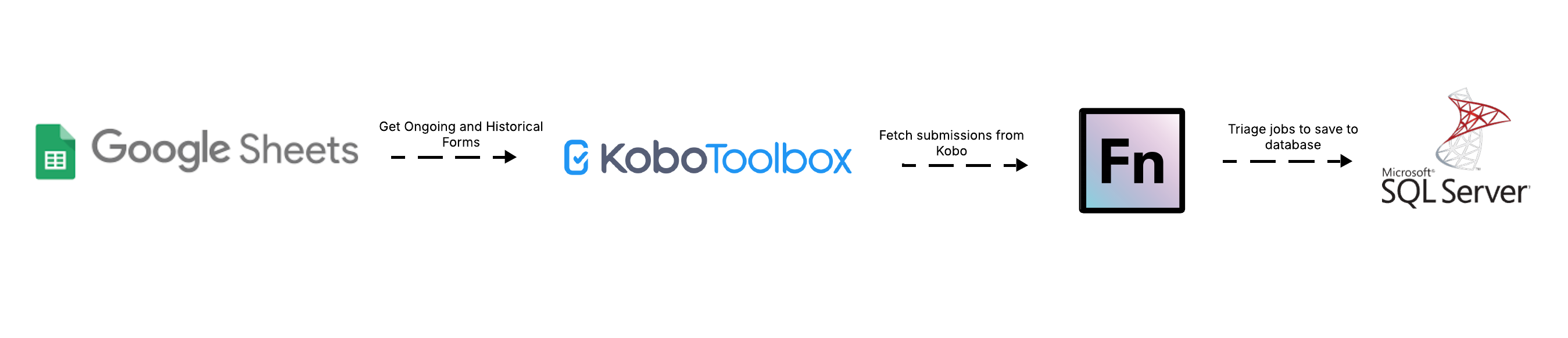
The system is built on the OpenFn platform and includes scheduled jobs to fetch new or historical submissions, route them based on form type, transform values to match database codes, and store clean, validated records.
Prerequisites
- Active KoboToolbox credentials
- Access to the Trillion Trees Google Sheet (
TT-DEPLOYED,TT-ARCHIVED) listing all relevant form configurations - Valid MS SQL database credentials and schema
- Standardized naming conventions and codes for enums and select options (e.g.
TT_TreeSpacingExtCode,TT_RegionExtCode)
Workflow Diagram
Field-to-DB Mappings
See here for the mapping specifications defined by WCS.
Data Flows & Workflow Descriptions
Overview
There are three main flows:
- Ongoing Sync (
1.1 Get Forms - Ongoing Gsheet)- Scheduled sync of actively deployed forms
- Fetches submissions after a recent timestamp (manualCursor)
- Filters based on
auto_sync = TRUEin the sheet
- Historical Sync (
1.2 Get Forms - Historical)- Manual/on-demand run to fetch legacy form submissions
- Fetches from both deployed and archived forms if
historical_sync = TRUE
- MSSQL Sync (
2. Sync Data to MSSQL)
| Workflow | Trigger Type | Schedule |
|---|---|---|
1.1 Get Forms - Ongoing Gsheet | Cron | Every 3 hours |
1.2 Get Forms - Historical | Manual | Run as needed |
2. Sync Data to MSSQL | Webhook | Triggered on inbox post |
3. Sync Forms Metadata | Cron | Daily at 6:00 AM |
Job Code Structure
Each job in the 2. Sync Data to MSSQL workflow is designed to take a single Kobo form submission and save it to the appropriate table(s) in the database. These jobs are written in JavaScript using OpenFn’s expression syntax, but follow a predictable pattern that makes them easy to read and extend.
Here’s a general overview of how these jobs work:
1. Read and filter the submission
The job first checks if the Kobo form submission should be processed. For example, if the submission is marked as a test (survey_type = practice), it is skipped. Otherwise, it extracts important details like:
- Submission ID
- Form name
- Region
- Submission date
This helps track each record and makes sure it’s being routed correctly.
2. Clean and format the data
Before saving anything to the database, the job ensures the data is clean and standardized:
- Text fields are trimmed (extra spaces removed)
- Dates are formatted correctly
- Responses like “yes” and “no” are converted to
1and0(or matched to internal codes)
This helps avoid errors when saving to the database and keeps things consistent.
3. Match answers to reference values
Some Kobo fields have dropdown choices (like region names or spacing types). These are mapped to standardized codes used in the database. For example:
"Sparse"spacing becomes codeTT001"Dense"spacing becomes codeTT002
This is done using lookup tables, and the job searches these tables to find the correct code for each answer.
4. Build the database record
Once the values are cleaned and matched, the job builds a structured “record” that matches the database format. It includes:
- All form responses
- A unique ID for the record
- Timestamps
- References to the original Kobo submission
If the form contains repeat groups (like a list of seedlings or people), each item is handled separately and linked back to the main record.
5. Save to the database
Finally, the job saves the cleaned and mapped data into the correct table using:
upsert()for a single record (e.g., planting data)upsertMany()for lists of related records (e.g., seedling monitoring entries)
OpenFn makes sure that if a record already exists (based on unique ID), it’s updated instead of duplicated.
ℹ️ Info: This structure is reused across all Trillion Trees form jobs — so adding a new form is mostly a matter of copying a job and updating the field mappings.
If you’re non-technical, you can still help by:
- Making sure Kobo forms are properly configured in the Google Sheet
- Reviewing mappings in the shared mapping spreadsheet
- Confirming which table each form should save to
Assumptions
- Kobo forms must be registered in the
TT-DEPLOYEDorTT-ARCHIVEDsheet - Each form entry must include:
form uidform nameform ownerDB table(used astableId)- Flags for
auto_syncorhistorical_sync
- Lookup values in MS SQL are uniquely identified via
ExtCodefields SurveyType != 'practice'is used to exclude test data- Each form submission is uniquely identified via
_id+_xform_id_stringcombo
Administration & Support
Provisioning, Hosting, & Maintenance
- This integration is hosted on OpenFn.org with hosted SaaS.
- The KoboToolBox Forms managed by WCS
Questions or support needed?
- For new project setup or scale-up requests, contact: Diane Detoeuf, Vanesa Reyes, Omar Torrico, Wendy Acahuana
- For technical support, raise a ticket via support@openfn.org