Social Sciences
Project Overview & Prerequisites
This project automates the ingestion and transformation of BNS and NRGT survey data collected via KoboToolbox into the WCS Programs MS SQL database using OpenFn.
The BNS & NRGT are standard surveys used by WCS for Monitoring & Evaluation purposes.
-
BNS stands for Basic Necessities Survey. It helps determine what a group of people (e.g. a community or village) consider to be life’s necessities, and whether they have them, resulting in a Well-Being Index. This is useful for measuring the impact of conservation interventions on people’s lives.
-
NRGT stands for Natural Resources Governance Tool. It assesses whether a local governance group has the authority, capacity, and power to govern natural resources in their jurisdiction.
👉 For more information, visit WCS Social Science FAQ.
Prerequisites
Before using this system, make sure the following are in place:
- All forms to be synced are listed in the WCS tracking Google Sheet (
wcs-bns-DEPLOYEDorwcs-bns-ARCHIVED) and marked withauto-sync = TRUE. - For older forms, set
historical_sync = TRUEin the sheet if you want to pull past submissions. - Each form has a tag assigned in the sheet (like
bns_priceornrgt_current) to make sure it’s processed correctly. - Database access is already set up using the WCS central database connection in OpenFn.
- Form questions follow expected formats and names, especially for repeat groups and matrix questions.
- Admins should review new or updated forms and update the sheet if needed, especially if forms are newly shared or archived.
Workflow Diagram
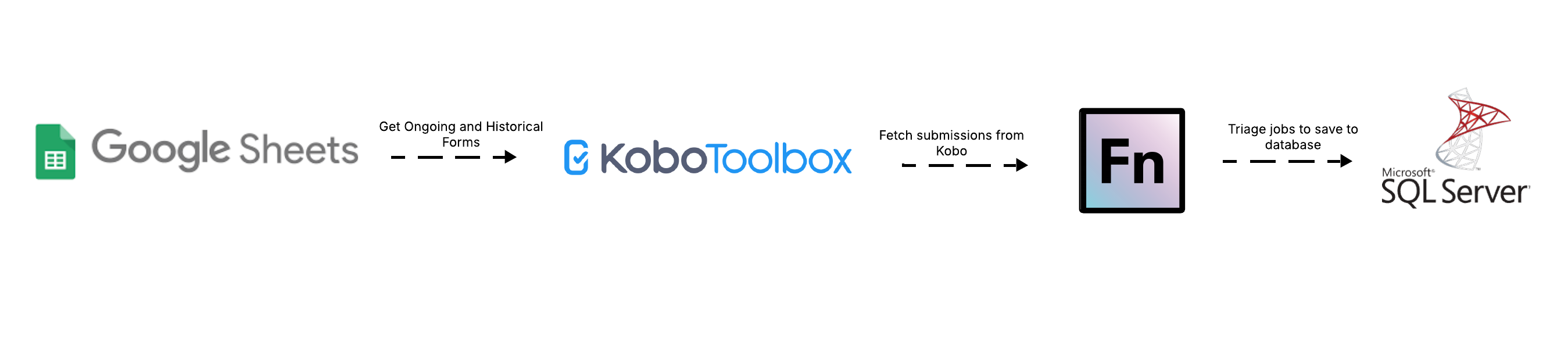
Field-to-DB Mappings
See here for the mapping specifications defined by WCS.
Data Flows & Workflow Descriptions
Overview
1. 1.1 Get BNS FormsList (Ongoing)
- Cron-triggered workflow that runs every few hours
- Connects to a shared Google Sheet (
wcs-bns-DEPLOYED) to fetch forms marked withauto_sync = TRUE - Adds cursor logic (manual or dynamic) to filter only new submissions
- Generates a list of Kobo API URLs and posts metadata for downstream processing
2. 1.2 Get BNS FormsList (Historical)
- Manually triggered workflow for syncing older submissions
- Pulls from both
wcs-bns-DEPLOYEDandwcs-bns-ARCHIVEDsheets - Filters for forms marked with
historical_sync = TRUE - Useful for onboarding legacy forms or backfilling the database
3. 2. Sync BNS and NRGT Forms
- Webhook-triggered by workflow
1.1 Get BNS FormsList (Ongoing)when submissions are present. - Runs a triage job to route the submission to the correct job:
BNS Price→ inserts intoWCSPROGRAMS_KoboBnsPriceBNS Survey→ inserts into:KoboBnsAnswerNRGT (historical or current)→ inserts intoKoboNrgtAnswer
Each job includes:
- Data cleaning and transformation logic
- Parsing of nested/repeat group responses
- Mapping Kobo field labels to internal DB codes using landscape or dropdown maps
- Insertion into SQL tables using
insert(),upsert(), andupsertMany()
Kobo Form Management
1. Integrating New Kobo Forms
If WCS would like to integrate a new BNS or NRGT Kobo form with the database…
- Delete any test submissions used in training/testing.
- Check if the form already has real submission data collected. If yes, add the
formIdto the Google Sheet Deployed Forms List and sethistorical_sync == true. Then manually trigger the workflow 1.2 Get BNS FormsList (Historical) to first migrate the historical data to the database (see more in data flow #2 below). - Add the new
formIdand relevant info to the Google Sheet Deployed Forms List to fetch data for this form on an ongoing basis. (See the Form Sharing docs for more on how this process.)
2. Disconnecting Kobo Forms
To remove a Kobo form from the integration flow, remove it from the Google Sheet Deployed Forms List or mark the column automate_sync: false.
Triggers & Scheduling
1. Scheduled Data Integration (Ongoing Sync)
- On a scheduled-basis (e.g., every 3 hours), a OpenFn job will run to fetch Kobo form data in bulk for the specified form Ids. See the Form Sharing docs for more on how this workflow works and can be managed.
Note that this workflow will:
- Post each individual Kobo survey back to the OpenFn inbox as an individual Message.
- Message filter triggers will execute the relevant jobs (see above list) to process & load the data into the connect DB.
View Activity History to monitor the success of these integration flows. If any Kobo data is cleaned, it will be fetched in the next job run and will overwrite* the matching record in the DB.
Note: These jobs have built-in transformations to create a custom unique identifier to map to the DB column DatasetUuidId, which can be used in the OpenFn job upsert() operations to ensure idempotency.
cleanedSubmission.durableUUID = `${_submission_time}-${_xform_id_string}-${_id}`;
2. Historical Kobo Migrations (Once-off)
If desired, Kobo forms submissions can be “re-synced” for historical or archived Kobo forms. See the Form Sharing docs for more on how this workflow works and can be managed.
3. Real-Time Integration (Not used, available as needed)
Note: This approach is not expected to be used because it is redundant to data flow #1, where data is already being fetched every 3 hours. However, this integration option remains available for scenarios where real-time data flow is important.
- For some forms, WCS may prefer to configure a *REST service** in Kobo Toolbox to forward Kobo surveys to OpenFn for real-time processing (rather than having the above job sync the data on a timed basis).
- To configure the Kobo REST service for real-time integration, see the instructions here.
- Every time WCS submits a new Kobo survey, the data will be forwarded automatically to the OpenFn Inbox. If the OpenFn jobs are “on”, this data will be processed and forwarded onto the database automatically.
Note This REST Service will not re-send Kobo data after it has been cleaned (only the initial submission). This is why the timer-based jobs are needed to sync cleaned Kobo data.
| Workflow Name | Trigger Type | Schedule |
|---|---|---|
1.1 Get BNS FormsList (Ongoing) | Cron | Every 3 hours |
1.2 Get BNS FormsList (Historical) | Manual | Run as needed |
2. Sync BNS and NRGT Forms | Webhook | Runs on submission |
Job Code Structure
Each job follows a consistent structure that ensures data from Kobo is validated, cleaned, mapped, and saved reliably. Here’s what happens step-by-step:
1. Validate and route submission
- Triages the form using known
formandtagvalues (e.g."bns_price","nrgt_current") - Skips incomplete or test submissions where applicable
2. Clean and normalize the data
- Converts
'yes'/'no'values to1/0 - Removes trailing spaces and standardizes date formats
- Constructs durable UUIDs for consistent tracking of each record
3. Transform and match values
- Uses a predefined
landscapeMapto assign internal codes based on form name - Parses repeat groups (e.g., goods, household members, matrix items)
- Handles GPS logic to validate and split coordinates into latitude/longitude fields
4. Construct database records
- Creates a main dataset record (
KoboData) to track metadata - Inserts:
- Price listings into
KoboBnsPrice - Household answers and members into
KoboBnsAnswerandhhmembers - NR matrix or governance scores into
KoboBnsAnswerGSorKoboNrgtAnswergs
- Price listings into
5. Save data safely
- Uses
upsert()to avoid duplicates - Inserts child records with
insertMany(), ensuring each record is linked viaAnswerIdandDatasetUuidId - Deletes any prior related records (e.g., old household members) before inserting new ones, to avoid duplication
Assumptions
- For idempotency, the jobs create a new Kobo
uuidto map to the DBDatasetUuidId. This is a concatenation of Kobo_id+_submission_time+_xform_id_string. We cannot use Kobo_uuidbecause this is refreshed every time a Kobo submission is cleaned. - All data cleaning will be done in Kobo Toolbox. Every time Kobo data is synced with the DB, it will overwrite the records saved there and use the above
uuidto upsert existing records. - In the
bns/survey.jsjob, we utiilize some of the Kobo form metadata to create data for thebns_matrixL52-L65 andnrL42-L50 question groups. It is therefore important that future versions of this form follow the same Kobo question naming conventions, otherwise the data will not map as expected and the job may need to be modified. - OpenFn will only automatically fetch the Kobo surveys where the form Ids have been specified in the Google Sheet Deployed Forms List.
Automated DB Configuration
Auto-Generate Tables & Jobs
Configuration Specs
Administration & Support
Provisioning, Hosting, & Maintenance
- This integration is hosted on OpenFn.org with hosted SaaS.
- The KoboToolBox Forms managed by WCS
Questions or support needed?
- For new project setup or scale-up requests, contact: Diane Detoeuf, Usmijuka, Narangua Batdorj
- For technical support, raise a ticket via support@openfn.org